Switching Between Student and Teacher Organizations
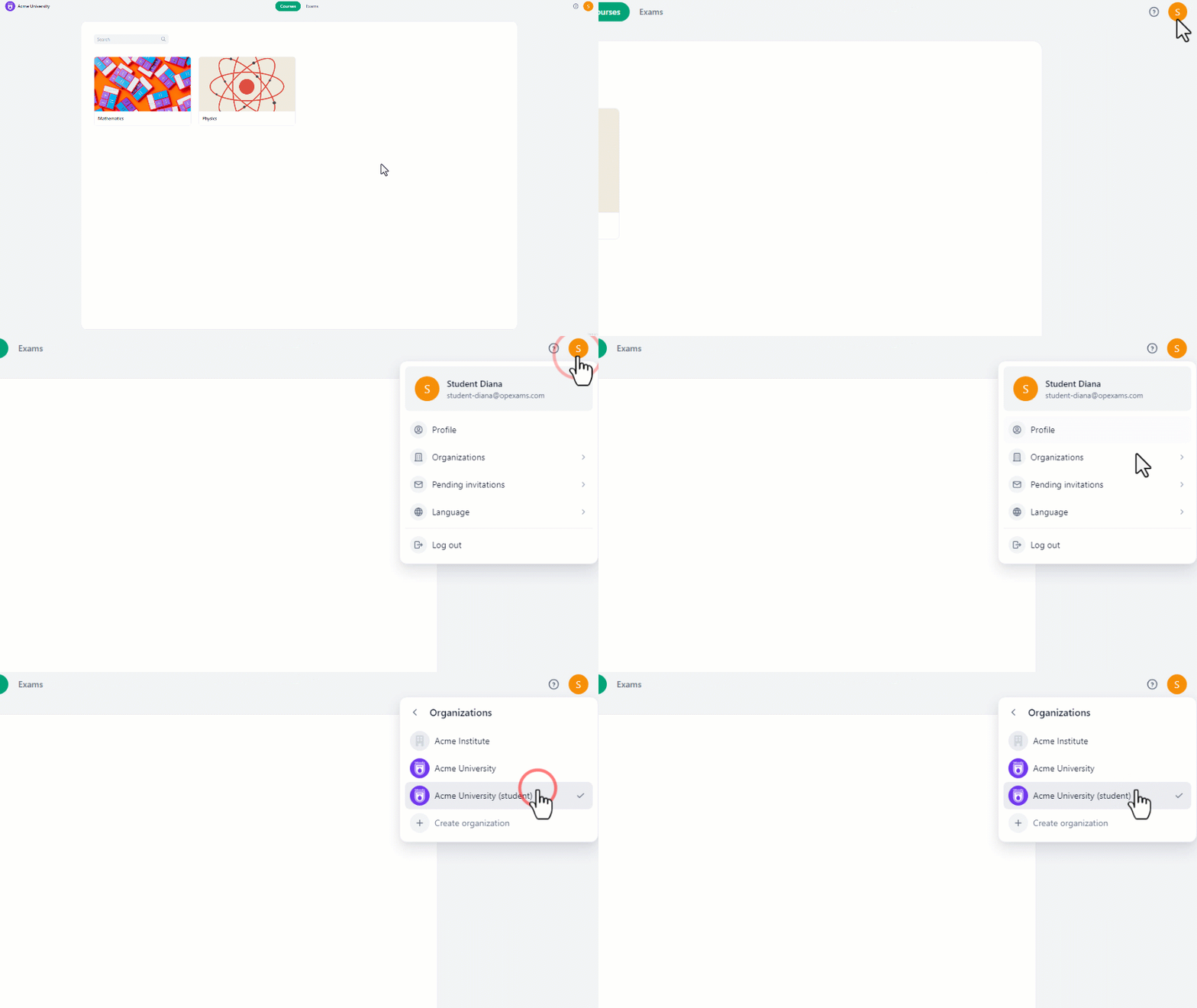
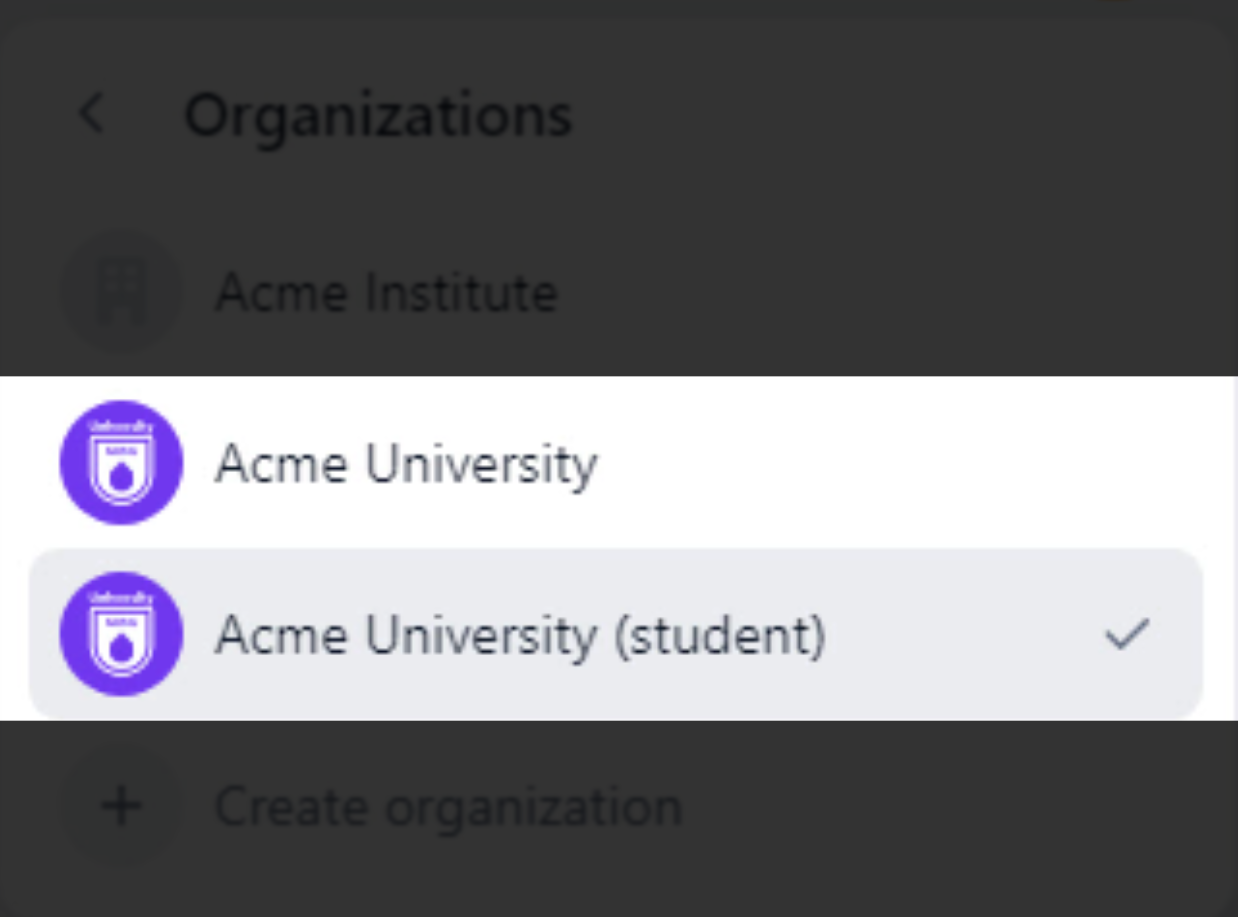
If you’re a student who’s been assigned as a teacher within the organization, you’ll gain access to some courses and management options.Therefore, another organization will be created within the student’s account with the same name as the original organization, but with different permissions.To access both organizations:
On the top right corner, click on the avatar icon.
In the drop-down menu, click “Organizations”.
There you will find both organizations.
{"docsConfig":{"theme":"mint","$schema":"https://mintlify.com/docs.json","name":"Opexams","colors":{"primary":"#00A378","light":"#0DC593","dark":"#007C5F"},"logo":{"light":"https://mintcdn.com/opexams-f9a35114/QUlI6DHGKnfA944_/logo/logo-light.png?fit=max\u0026auto=format\u0026n=QUlI6DHGKnfA944_\u0026q=85\u0026s=d409f278badefe25a2c6a98772b9ef5b","dark":"https://mintcdn.com/opexams-f9a35114/QUlI6DHGKnfA944_/logo/logo-dark.png?fit=max\u0026auto=format\u0026n=QUlI6DHGKnfA944_\u0026q=85\u0026s=91225703af9afa64dc4e952f858545b2"},"favicon":"https://mintcdn.com/opexams-f9a35114/QUlI6DHGKnfA944_/favicon.ico?fit=max\u0026auto=format\u0026n=QUlI6DHGKnfA944_\u0026q=85\u0026s=d41bcadd5b397af2b3b2a1584d1fa79b","navbar":{"links":[],"primary":{"type":"button","label":"OpExams","href":"https://app.opexams.com"}},"footer":{"socials":{}},"fonts":{"family":"Inter"},"contextual":{"options":["copy","view","chatgpt","claude","perplexity","mcp","cursor","vscode"],"display":"header"},"styling":{"latex":false},"navigation":{"global":{"anchors":[]},"languages":[{"language":"en","href":"accepting-invite"},{"language":"ar","href":"ar/accepting-invite"}]}},"deployment":{"deploymentMetadataValue":{"subdomain":"opexams-f9a35114","hasAudioNarration":false,"actualSubdomain":"opexams-f9a35114","customDomains":["docs.opexams.com"],"gitSource":{"type":"github","owner":"hypatiatech","repo":"otto","deployBranch":"production","contentDirectory":"docs","isPrivate":true,"mountPath":"","label":""},"chroma":{"liveDeploymentHistoryId":"6a21eb1a7fd5f14b8ebb0544","collectionId":"46c96a47-7d47-4a45-bf8e-2e2839404d02","schemaVersion":"v2"},"entitlements":{},"buildId":"6a21eb1a7fd5f14b8ebb0544:success","clientVersion":"0.0.3971","searchFilterCounts":[{"language":"ar","tag":"للمعلمين","count":39},{"language":"en","tag":"For Teachers","count":38},{"language":"en","tag":"Questions","count":14},{"language":"ar","tag":"الأسئلة","count":14},{"language":"ar","tag":"البدء","count":8},{"language":"en","tag":"Getting Started","count":6},{"language":"ar","tag":"الأساسيات","count":6},{"language":"ar","tag":"الدورات","count":6},{"language":"en","tag":"Courses","count":5},{"language":"en","tag":"Essentials","count":4},{"language":"en","tag":"Students Management","count":4},{"language":"en","tag":"Administration","count":4},{"language":"en","tag":"Online Exam Settings","count":4},{"language":"en","tag":"For Supervisors","count":4},{"language":"ar","tag":"إدارة الطلاب","count":4},{"language":"ar","tag":"إعدادات الامتحان عبر الإنترنت","count":4},{"language":"ar","tag":"مسؤول إشراف","count":4},{"language":"en","tag":"Managing Students in Groups","count":3},{"language":"ar","tag":"إدارة الطلاب في المجموعات","count":3},{"language":"ar","tag":"المجموعات","count":3}]},"assistantConfig":{"enableAskAiButton":false,"enableStarterQuestions":false,"enableAskAiSearchBar":true},"basePath":"","hasChatPermissions":false,"hasWebMcpPermissions":false,"toggles":[{"name":"kill-isr","enabled":true,"variant":{"name":"disabled","enabled":false,"feature_enabled":true},"impressionData":false},{"name":"agent-mintlify-slack","enabled":true,"variant":{"name":"disabled","enabled":false,"feature_enabled":true},"impressionData":false},{"name":"editor-v7-file-tree","enabled":true,"variant":{"name":"disabled","enabled":false,"feature_enabled":true},"impressionData":false},{"name":"agent-integrations-settings","enabled":true,"variant":{"name":"disabled","enabled":false,"feature_enabled":true},"impressionData":false},{"name":"automations-pr-grouping","enabled":true,"variant":{"name":"disabled","enabled":false,"feature_enabled":true},"impressionData":false},{"name":"custom-prefix","enabled":true,"variant":{"name":"disabled","enabled":false,"feature_enabled":true},"impressionData":false},{"name":"analytics-v7","enabled":true,"variant":{"name":"disabled","enabled":false,"feature_enabled":true},"impressionData":false},{"name":"user-flows-analytics","enabled":true,"variant":{"name":"disabled","enabled":false,"feature_enabled":true},"impressionData":false},{"name":"no-publish-flow","enabled":true,"variant":{"name":"disabled","enabled":false,"feature_enabled":true},"impressionData":false},{"name":"workos-onboarding","enabled":true,"variant":{"name":"disabled","enabled":false,"feature_enabled":true},"impressionData":false},{"name":"llms-txt-v2","enabled":true,"variant":{"name":"disabled","enabled":false,"feature_enabled":true},"impressionData":false},{"name":"pause-universal-search-reconcile","enabled":true,"variant":{"name":"disabled","enabled":false,"feature_enabled":true},"impressionData":false},{"name":"snapshot-serving-live","enabled":true,"variant":{"name":"disabled","enabled":false,"feature_enabled":true},"impressionData":false},{"name":"stripTemperatureMiddleware","enabled":true,"variant":{"name":"disabled","enabled":false,"feature_enabled":true},"impressionData":false},{"name":"per-site-search-delta","enabled":true,"variant":{"name":"disabled","enabled":false,"feature_enabled":true},"impressionData":false},{"name":"support-platform-pylon-zendesk","enabled":true,"variant":{"name":"disabled","enabled":false,"feature_enabled":true},"impressionData":false},{"name":"snapshot-serving","enabled":true,"variant":{"name":"disabled","enabled":false,"feature_enabled":true},"impressionData":false},{"name":"instant-rollback","enabled":true,"variant":{"name":"disabled","enabled":false,"feature_enabled":true},"impressionData":false},{"name":"granular-notifications-server","enabled":true,"variant":{"name":"disabled","enabled":false,"feature_enabled":true},"impressionData":false},{"name":"granular-notifications","enabled":true,"variant":{"name":"disabled","enabled":false,"feature_enabled":true},"impressionData":false},{"name":"editor-private-page-search","enabled":true,"variant":{"name":"disabled","enabled":false,"feature_enabled":true},"impressionData":false},{"name":"automations-fable","enabled":true,"variant":{"name":"disabled","enabled":false,"feature_enabled":true},"impressionData":false},{"name":"fixed-ai-action-pricing","enabled":true,"variant":{"name":"disabled","enabled":false,"feature_enabled":true},"impressionData":false},{"name":"automation-resolve-merge-conflict","enabled":true,"variant":{"name":"disabled","enabled":false,"feature_enabled":true},"impressionData":false},{"name":"scoped-publishing","enabled":true,"variant":{"name":"disabled","enabled":false,"feature_enabled":true},"impressionData":false},{"name":"mintql","enabled":true,"variant":{"name":"disabled","enabled":false,"feature_enabled":true},"impressionData":false},{"name":"page-level-analytics","enabled":true,"variant":{"name":"disabled","enabled":false,"feature_enabled":true},"impressionData":false},{"name":"editor-version-history-v2","enabled":true,"variant":{"name":"disabled","enabled":false,"feature_enabled":true},"impressionData":false},{"name":"editor-nav-generations","enabled":true,"variant":{"name":"disabled","enabled":false,"feature_enabled":true},"impressionData":false},{"name":"billing-page-v2","enabled":true,"variant":{"name":"disabled","enabled":false,"feature_enabled":true},"impressionData":false},{"name":"workspace-projects","enabled":true,"variant":{"name":"disabled","enabled":false,"feature_enabled":true},"impressionData":false},{"name":"assistant-v5","enabled":true,"variant":{"name":"disabled","enabled":false,"feature_enabled":true},"impressionData":false},{"name":"byok-sep-25","enabled":true,"variant":{"name":"disabled","enabled":false,"feature_enabled":true},"impressionData":false},{"name":"fork-pr-previews","enabled":true,"variant":{"name":"disabled","enabled":false,"feature_enabled":true},"impressionData":false},{"name":"revalidation-jwt","enabled":true,"variant":{"name":"disabled","enabled":false,"feature_enabled":true},"impressionData":false},{"name":"vite-origin","enabled":true,"variant":{"name":"disabled","enabled":false,"feature_enabled":true},"impressionData":false},{"name":"editor-agent-model-picker","enabled":true,"variant":{"name":"disabled","enabled":false,"feature_enabled":true},"impressionData":false},{"name":"billing-updated-9-15","enabled":true,"variant":{"name":"disabled","enabled":false,"feature_enabled":true},"impressionData":false},{"name":"workos-sso-scim","enabled":true,"variant":{"name":"disabled","enabled":false,"feature_enabled":true},"impressionData":false},{"name":"hobby-abuse-scan","enabled":true,"variant":{"name":"disabled","enabled":false,"feature_enabled":true},"impressionData":false},{"name":"dashboard-inbox","enabled":true,"variant":{"name":"disabled","enabled":false,"feature_enabled":true},"impressionData":false},{"name":"workos-signup","enabled":true,"variant":{"name":"disabled","enabled":false,"feature_enabled":true},"impressionData":false},{"name":"workos-enabled","enabled":true,"variant":{"name":"disabled","enabled":false,"feature_enabled":true},"impressionData":false}],"isAtlas":false,"googleFontsInlined":false},"customCss":[],"page":{"pagePath":"switching-between-student-and-teacher-organizations","slug":"/switching-between-student-and-teacher-organizations","pageMetadata":{"title":"Switching Between Student and Teacher Organizations","description":null,"href":"/switching-between-student-and-teacher-organizations","hidden":false},"pageType":"default","mdx":{"mdxSource":{"compiledSource":"\"use strict\";const{Fragment:_Fragment,jsx:_jsx,jsxs:_jsxs}=arguments[0];const{useMDXComponents:_provideComponents}=arguments[0];function _createMdxContent(props){const _components={img:`img`,li:`li`,ol:`ol`,p:`p`,strong:`strong`,..._provideComponents(),...props.components};return _jsxs(_Fragment,{children:[_jsx(`video`,{width:`718`,controls:true,children:_jsx(`source`,{src:`https://doocs.fra1.digitaloceanspaces.com/fRN2yAkN4odG7DhG7q0IFxlOdlKgAcQ/Switching-Between-Student-and-Teacher-Organizations.mp4`,type:`video/mp4`})}),`\n`,_jsx(_components.p,{children:`If you’re a student who’s been assigned as a teacher within the organization, you’ll gain access to some courses and management options.Therefore, another organization will be created within the student’s account with the same name as the original organization, but with different permissions.`}),`\n`,_jsx(_components.p,{children:`To access both organizations:`}),`\n`,_jsxs(_components.ol,{children:[`\n`,_jsxs(_components.li,{children:[`On the top right corner, click on the `,_jsx(_components.strong,{children:`avatar icon`}),`.`]}),`\n`,_jsxs(_components.li,{children:[`In the drop-down menu, click “`,_jsx(_components.strong,{children:`Organizations`}),`”.`]}),`\n`,_jsx(_components.li,{children:`There you will find both organizations.`}),`\n`]}),`\n`,_jsx(_components.p,{children:_jsx(_components.img,{src:`https://doocs.fra1.digitaloceanspaces.com/0WJDYsKWdAjmgYjBLpk1mHjqfKyszXT/Switching-Between-Student-and-Teacher-Organizations-Gif1.gif`,alt:``})}),`\n`,_jsx(_components.p,{children:_jsx(_components.img,{src:`https://doocs.fra1.digitaloceanspaces.com/lYFre6aG6jsC4v_zVhFW6lk671GXe4R/Organizations2%20cut.png`,alt:``})})]})}function MDXContent(props={}){const{wrapper:MDXLayout}={..._provideComponents(),...props.components};return MDXLayout?_jsx(MDXLayout,{...props,children:_jsx(_createMdxContent,{...props})}):_createMdxContent(props)}return{default:MDXContent}","frontmatter":{},"scope":{"config":{},"pageMetadata":{"title":"Switching Between Student and Teacher Organizations","description":null,"href":"/switching-between-student-and-teacher-organizations","hidden":false}}},"mdxSourceWithNoJs":null},"mdxExtracts":{"tableOfContents":[],"codeExamples":{}},"jsLinks":["/_mintlify/custom/opexams-f9a35114/4fed071fda9ad57b/rtl-support.js"],"subdomain":"opexams-f9a35114","siteName":"Opexams","title":"Switching Between Student and Teacher Organizations - Opexams","navMaps":{"firstHrefInVersion":{},"firstHrefInLanguage":{"en":{"href":"/switching-between-student-and-teacher-organizations","matchLevel":0},"ar":{"href":"/ar/switching-between-student-and-teacher-organizations","matchLevel":1}}},"lastModified":"2026-02-02T07:47:12.478Z","originalFileLocation":"switching-between-student-and-teacher-organizations.mdx","locale":"en"},"headHtml":"\u003cscript data-mint-head>(function(){var d=document.documentElement,p=null;if(!p){try{p=localStorage.getItem(\"isDarkMode\")}catch(e){}if(p==='true')p='dark';else if(p==='false')p='light';if(p!=='light'\u0026\u0026p!=='dark'\u0026\u0026p!=='system')p=\"system\"}var r=p==='system'?(matchMedia(\"(prefers-color-scheme: dark)\").matches?'dark':'light'):p;d.classList.remove(r==='dark'?'light':'dark');d.classList.add(r);d.setAttribute(\"data-theme-preference\",p)})();\u003c/script>\u003cmeta data-mint-head name=\"application-name\" content=\"Opexams\">\u003cmeta data-mint-head name=\"generator\" content=\"Mintlify\">\u003clink data-mint-head rel=\"icon\" type=\"image/png\" sizes=\"192x192\" href=\"/mintlify-assets/_mintlify/favicons/opexams-f9a35114/e-FVT8i1Abmzpr5U/_generated/favicon/android-chrome-192x192.png\" media=\"(prefers-color-scheme: light)\">\u003clink data-mint-head rel=\"apple-touch-icon\" type=\"image/png\" sizes=\"180x180\" href=\"/mintlify-assets/_mintlify/favicons/opexams-f9a35114/e-FVT8i1Abmzpr5U/_generated/favicon/apple-touch-icon.png\">\u003clink data-mint-head rel=\"icon\" type=\"image/png\" sizes=\"16x16\" href=\"/mintlify-assets/_mintlify/favicons/opexams-f9a35114/e-FVT8i1Abmzpr5U/_generated/favicon/favicon-16x16.png\" media=\"(prefers-color-scheme: light)\">\u003clink data-mint-head rel=\"icon\" type=\"image/png\" sizes=\"32x32\" href=\"/mintlify-assets/_mintlify/favicons/opexams-f9a35114/e-FVT8i1Abmzpr5U/_generated/favicon/favicon-32x32.png\" media=\"(prefers-color-scheme: light)\">\u003clink data-mint-head rel=\"shortcut icon\" type=\"image/x-icon\" href=\"/mintlify-assets/_mintlify/favicons/opexams-f9a35114/e-FVT8i1Abmzpr5U/_generated/favicon/favicon.ico\" media=\"(prefers-color-scheme: light)\">\u003clink data-mint-head rel=\"icon\" type=\"image/png\" sizes=\"192x192\" href=\"/mintlify-assets/_mintlify/favicons/opexams-f9a35114/e-FVT8i1Abmzpr5U/_generated/favicon-dark/android-chrome-192x192.png\" media=\"(prefers-color-scheme: dark)\">\u003clink data-mint-head rel=\"icon\" type=\"image/png\" sizes=\"16x16\" href=\"/mintlify-assets/_mintlify/favicons/opexams-f9a35114/e-FVT8i1Abmzpr5U/_generated/favicon-dark/favicon-16x16.png\" media=\"(prefers-color-scheme: dark)\">\u003clink data-mint-head rel=\"icon\" type=\"image/png\" sizes=\"32x32\" href=\"/mintlify-assets/_mintlify/favicons/opexams-f9a35114/e-FVT8i1Abmzpr5U/_generated/favicon-dark/favicon-32x32.png\" media=\"(prefers-color-scheme: dark)\">\u003clink data-mint-head rel=\"shortcut icon\" type=\"image/x-icon\" href=\"/mintlify-assets/_mintlify/favicons/opexams-f9a35114/e-FVT8i1Abmzpr5U/_generated/favicon-dark/favicon.ico\" media=\"(prefers-color-scheme: dark)\">\u003cmeta data-mint-head property=\"og:title\" content=\"Switching Between Student and Teacher Organizations - Opexams\">\u003cmeta data-mint-head property=\"og:site_name\" content=\"Opexams\">\u003cmeta data-mint-head property=\"og:url\" content=\"https://docs.opexams.com/switching-between-student-and-teacher-organizations\">\u003cmeta data-mint-head property=\"og:type\" content=\"website\">\u003cmeta data-mint-head property=\"og:image\" content=\"https://opexams-f9a35114.mintlify.app/_mintlify/api/og/v2?division=Account+Management\u0026amp;title=Switching+Between+Student+and+Teacher+Organizations\u0026amp;theme=4eb986ffb63b5614bad2e5d0\u0026amp;signature=5adbc42d43286c8788534e0a99a2cdff07ee1f30ceb3bf4c4b3469183fa6153d\">\u003cmeta data-mint-head property=\"og:image:width\" content=\"1200\">\u003cmeta data-mint-head property=\"og:image:height\" content=\"630\">\u003cmeta data-mint-head name=\"twitter:card\" content=\"summary_large_image\">\u003cmeta data-mint-head name=\"twitter:title\" content=\"Switching Between Student and Teacher Organizations - Opexams\">\u003cmeta data-mint-head name=\"twitter:image\" content=\"https://opexams-f9a35114.mintlify.app/_mintlify/api/og/v2?division=Account+Management\u0026amp;title=Switching+Between+Student+and+Teacher+Organizations\u0026amp;theme=4eb986ffb63b5614bad2e5d0\u0026amp;signature=5adbc42d43286c8788534e0a99a2cdff07ee1f30ceb3bf4c4b3469183fa6153d\">\u003cmeta data-mint-head name=\"twitter:image:width\" content=\"1200\">\u003cmeta data-mint-head name=\"twitter:image:height\" content=\"630\">\u003cmeta data-mint-head name=\"msapplication-config\" content=\"/mintlify-assets/_mintlify/favicons/opexams-f9a35114/e-FVT8i1Abmzpr5U/_generated/favicon/browserconfig.xml\">\u003cmeta data-mint-head name=\"apple-mobile-web-app-title\" content=\"Opexams\">\u003cmeta data-mint-head name=\"msapplication-TileColor\" content=\"#00A378\">\u003clink data-mint-head rel=\"canonical\" href=\"https://docs.opexams.com/switching-between-student-and-teacher-organizations\">\u003clink data-mint-head rel=\"alternate\" type=\"application/xml\" href=\"/sitemap.xml\">\u003clink data-mint-head rel=\"alternate\" type=\"text/markdown\" href=\"/switching-between-student-and-teacher-organizations.md\">\u003clink data-mint-head rel=\"alternate\" hreflang=\"en\" href=\"https://docs.opexams.com/switching-between-student-and-teacher-organizations\">\u003clink data-mint-head rel=\"alternate\" hreflang=\"ar\" href=\"https://docs.opexams.com/ar/switching-between-student-and-teacher-organizations\">\u003clink data-mint-head rel=\"alternate\" hreflang=\"x-default\" href=\"https://docs.opexams.com/switching-between-student-and-teacher-organizations\">\u003cscript data-mint-head type=\"application/ld+json\">{\"@context\":\"https://schema.org\",\"@graph\":[{\"@type\":\"Organization\",\"@id\":\"https://docs.opexams.com/#organization\",\"name\":\"Opexams\",\"url\":\"https://docs.opexams.com\",\"logo\":{\"@type\":\"ImageObject\",\"url\":\"https://mintcdn.com/opexams-f9a35114/QUlI6DHGKnfA944_/logo/logo-light.png?fit=max\u0026auto=format\u0026n=QUlI6DHGKnfA944_\u0026q=85\u0026s=d409f278badefe25a2c6a98772b9ef5b\"}},{\"@type\":\"WebSite\",\"@id\":\"https://docs.opexams.com#website\",\"name\":\"Opexams\",\"url\":\"https://docs.opexams.com\",\"publisher\":{\"@id\":\"https://docs.opexams.com/#organization\"}},{\"@type\":\"WebPage\",\"@id\":\"https://docs.opexams.com/switching-between-student-and-teacher-organizations#webpage\",\"url\":\"https://docs.opexams.com/switching-between-student-and-teacher-organizations\",\"name\":\"Switching Between Student and Teacher Organizations\",\"dateModified\":\"2026-02-02T07:47:12.478Z\",\"isPartOf\":{\"@id\":\"https://docs.opexams.com#website\"},\"breadcrumb\":{\"@id\":\"https://docs.opexams.com/switching-between-student-and-teacher-organizations#breadcrumb\"}},{\"@type\":\"BreadcrumbList\",\"@id\":\"https://docs.opexams.com/switching-between-student-and-teacher-organizations#breadcrumb\",\"itemListElement\":[{\"@type\":\"ListItem\",\"position\":1,\"name\":\"Account Management\",\"item\":\"https://docs.opexams.com/switching-organizations\"},{\"@type\":\"ListItem\",\"position\":2,\"name\":\"Switching Between Student and Teacher Organizations\",\"item\":\"https://docs.opexams.com/switching-between-student-and-teacher-organizations\"}]},{\"@type\":[\"Article\",\"TechArticle\"],\"@id\":\"https://docs.opexams.com/switching-between-student-and-teacher-organizations#article\",\"headline\":\"Switching Between Student and Teacher Organizations\",\"name\":\"Switching Between Student and Teacher Organizations\",\"url\":\"https://docs.opexams.com/switching-between-student-and-teacher-organizations\",\"mainEntityOfPage\":{\"@id\":\"https://docs.opexams.com/switching-between-student-and-teacher-organizations#webpage\"},\"dateModified\":\"2026-02-02T07:47:12.478Z\",\"publisher\":{\"@id\":\"https://docs.opexams.com/#organization\"},\"isPartOf\":{\"@id\":\"https://docs.opexams.com#website\"}}]}\u003c/script>\u003cscript data-mint-head type=\"application/ld+json\">{\"@context\":\"https://schema.org\",\"@type\":\"WebSite\",\"name\":\"Opexams\",\"creator\":{\"@type\":\"Organization\",\"name\":\"Mintlify\",\"url\":\"https://mintlify.com\"}}\u003c/script>","siteName":"Opexams","nav":{"global":{"anchors":[]},"languages":[{"language":"en","tabs":[{"tab":"Getting Started","groups":[{"group":"Essentials","pages":[{"title":"Accepting Invite","href":"/accepting-invite"},{"title":"Accepting Invite Without Email Account","href":"/accepting-invite-without-email"},{"title":"Merging Your No-Email Account","href":"/merging-no-email-account"},{"title":"Reading Exam Reports","href":"/reading-exam-reports"}]},{"group":"Account Management","pages":[{"title":"Switching Organizations","description":"Learn how to switch between multiple organizations in your account.","href":"/switching-organizations"},{"title":"Switching Between Student and Teacher Organizations","href":"/switching-between-student-and-teacher-organizations"}]}]},{"tab":"For Students","pages":[{"title":"For Students","href":"/viewing-assignments"}]},{"tab":"For Supervisors","pages":[{"title":"For Supervisors","href":"/supervisor-role"}]},{"tab":"For Teachers","pages":[{"title":"For Teachers","href":"/import-from-previous-exam"}]},{"tab":"Administration","pages":[{"title":"Administration","href":"/localization"}]}]},{"language":"ar","pages":[{"title":"ar","href":"/ar/switching-between-student-and-teacher-organizations"}]}]},"title":"Switching Between Student and Teacher Organizations - Opexams","buildId":"dpl_DFJrtvUi8HS5F9nkooKuDJsuD5BM","deploymentId":"dpl_DFJrtvUi8HS5F9nkooKuDJsuD5BM","dynamics":["a74be98ba7"],"chunks":["zoom-image-lightbox-BZxD9MAj.js","lightbox-handle-r17bVUz3.js"]}